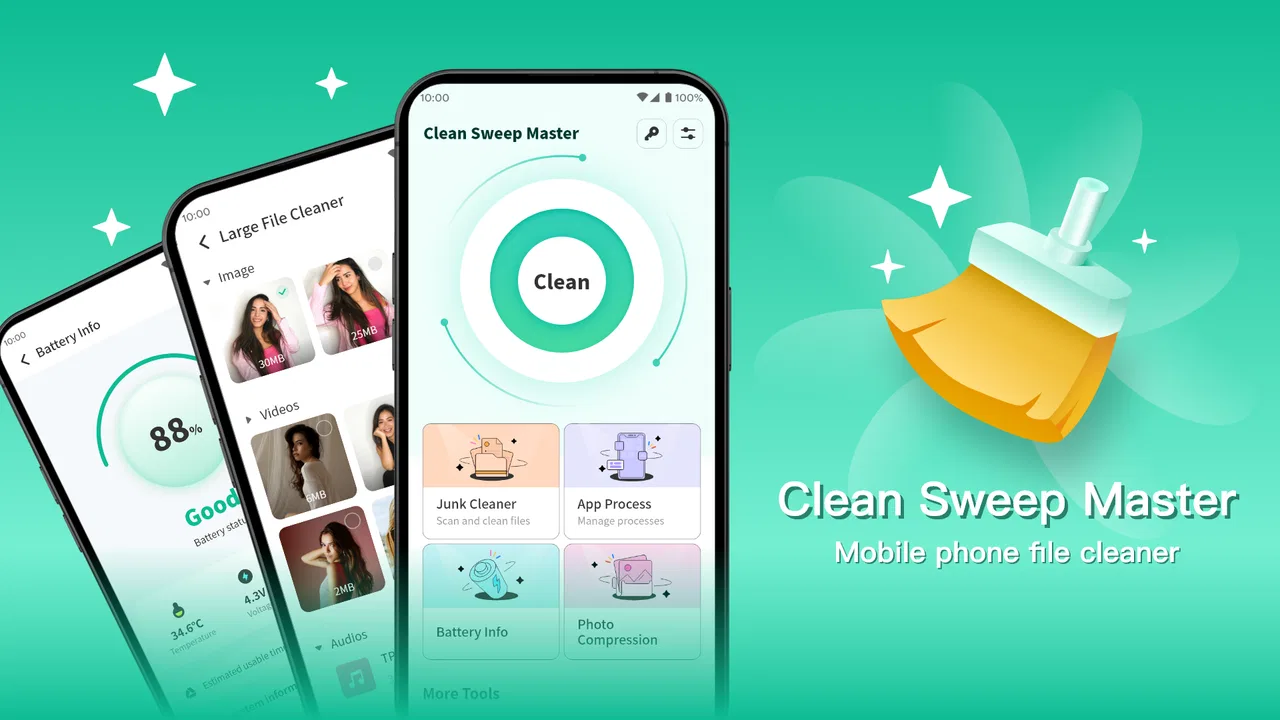
Clean Sweep Master
- 4.2
- Rating
- 5.00M
- Installs
- Free
- Price

 Analysis by App-foxy
When my phone starts warning me about low storage, I usually do not want a complicated maintenance suite. I want a clear way to find what is taking up space, remove genuine clutter, and avoid deleting something I may need later. Clean Sweep Master approaches that everyday problem as a free productivity app from ZJDevKing, with a simple promise: help resolve device-cleaning issues without turning the process into a technical project.
After spending time with it, my impression is that its appeal comes from being easy to understand. The app is aimed at people who want a cleaner device but do not necessarily know which folders, downloads, or leftovers are safe to remove. It is not presented as a power-user repair tool, and I would not treat it as one. Instead, I see it as a practical first stop when storage feels disorganized and I need guidance before making changes.
How Clean Sweep Master feels in its current state
The current release is version 1.1.1, and that matters because the app is still relatively early in its product life. It was released on January 18, 2026, so I approach it as a young utility that has already attracted attention but may still be refining its workflow. Its store summary focuses on resolving device-cleaning issues, while the shorter description calls it “Clean Sweep.” Those phrases are brief, but they point to the app’s central role rather than suggesting an oversized collection of unrelated tools.
You May Also Like

 Blood Strike: 2.5 Anniversary
Blood Strike’s Loadouts Turn Every Drop Into a Tactical Gamble
A close look at Blood Strike’s custom loadouts: how fast access to signature weapons reshapes its battle royale rhythm, rewards preparation, and narrows the gap between fights.

 Pandora - Music & Podcasts
Pandora’s Music Is Easy to Start, but Harder to Recover
Pandora’s strength is its low-effort path from a seed to a station. Its weak spot is how much confidence it asks you to place in connection, setup, and quiet recovery.

 8 Ball Pool
 Is Built on Rivalries, Rematches, and Routine
A close look at the rivalries, rematches, shared routines, and unanswered safety questions that turn a quick pool match into a persistent mobile community.

 Samsung Music
’s Quiet Strength Is Playing What You Already Own
Its reach comes less from spectacle than from dependable access to a personal library. That simplicity is both the app’s strongest retention engine and its ceiling.

 AccuWeather: Weather Radar
AccuWeather Review: A Quick, Clear Forecast for Everyday Decisions
For everyday plans, the best forecast is the one you can understand quickly. AccuWeather makes rain timing, radar, and local conditions easy to act on, with a few trade-offs.

 Hill Climb Racing
Why Hill Climb Racing Still Turns Crashes Into One More Run
A tiny car, a bumpy hill and one more upgrade: Hill Climb Racing keeps resurfacing because its simple chaos makes every near-miss feel personal.
More From Our News Desk



In practical use, I would begin with a scan rather than immediately pressing a cleaning command. That habit is important with any storage app, but especially with a newer one: the useful part is not simply finding a large amount of data, but understanding what the app has classified and why. A cleaning recommendation is only valuable when I can review it comfortably before confirming.
The interface is best judged by how quickly it helps answer three questions: what is consuming storage, what can be removed safely, and what should remain untouched. Clean Sweep Master is most attractive when it keeps those decisions visible instead of burying them behind technical labels. For a family member, a student, or anyone who dislikes digging through system menus, that straightforward approach can save time.
It also fits the productivity category better than the entertainment side of mobile software. The benefit is not something I use continuously; it is a small maintenance task that makes the phone easier to manage afterward. I would open it when storage becomes a problem, after a long period of downloading files, or before installing a large application. That makes the app useful in short sessions rather than something that needs to run in the background all day.
A realistic storage-cleaning routine
Imagine taking several videos during a family event, downloading documents for work, and receiving a stream of images through messaging apps. A few weeks later, the phone feels sluggish to manage, and the storage warning appears. My preferred routine with Clean Sweep Master would be to scan first, inspect the categories it presents, and deal with the obvious disposable material before touching anything ambiguous.
I would handle large personal videos separately from temporary clutter. A video may occupy more space, but size alone does not make it junk. This is one of the most important distinctions for any cleaner: the biggest item is often the least suitable item for automatic removal. I would preserve anything I may want later, back it up through my normal method, and use the cleaner for material I have already identified as unnecessary.
That workflow reveals a useful trade-off. The app can make discovery faster, but it cannot know the personal value of every file. A screenshot of a receipt, an old download, or a duplicate image may look disposable to a machine while still being important to me. I therefore see the app as a decision assistant, not a substitute for reviewing my own files.
What the early release tells me about the product
The version history available in the product’s current identity gives me a reason to keep expectations measured. Version 1.1.1 suggests an active early stage rather than a long-established maintenance platform. That is not automatically a weakness. Newer software can feel less burdened by unnecessary menus, and a focused tool may be easier to learn than a mature suite packed with features I never use.
At the same time, an early release deserves a more careful approach to important actions. I would not run any cleaning process blindly, especially on a phone containing work files, family photos, or offline travel documents. I would also avoid assuming that a scan result is a complete picture of the device. A cleaner may identify certain types of removable material while leaving other storage categories for the phone’s own settings or a dedicated file manager.
That is where Clean Sweep Master’s current position becomes clearer. It is convenient for a guided cleanup, but it should sit alongside ordinary Android storage tools rather than replace them entirely. The system settings remain the better place to understand application storage, uninstall software I no longer use, and check which apps are responsible for long-term growth.
The app supports Android 6.0 and later, which gives it a wide potential audience across older and newer devices. For someone using an older handset, a lightweight cleaning workflow may be more comfortable than a feature-heavy alternative. However, compatibility does not mean every phone will present storage in exactly the same way. Android versions, manufacturer interfaces, and app-specific storage rules can affect what a cleaner is able to identify.
Who will benefit most from using it
I would recommend Clean Sweep Master to people who want a clear starting point and do not enjoy manual file management. It is particularly suitable for users who repeatedly postpone cleanup because the phone’s folders feel confusing. A guided scan can turn an unpleasant chore into a short review session, provided the user still checks the results before confirming removal.
It may also suit someone helping another person maintain a phone. Instead of explaining every storage category in system settings, I could use the app as a visual starting point and then teach the person to recognize the difference between temporary material and personal files. That is a more sustainable habit than simply pressing a large clean button whenever the device slows down.
People with limited free space may appreciate the timing of a focused tool. If I need to install an important app or record something immediately, finding removable clutter can be faster than manually opening every folder. The key is to use it for targeted relief, not to treat every scan as permission to erase broadly.
On the other hand, I would skip it if I already maintain storage carefully with a file manager, cloud backup, and Android’s built-in tools. In that situation, another cleaner may add an extra step rather than solve a real problem. I would also hesitate to rely on it for professional device administration, forensic recovery, or detailed storage auditing. Those tasks call for specialized tools and a much more controlled process.
Where it differs from the usual alternatives
The most obvious alternative is Android’s own storage management. Built-in tools have the advantage of being closely connected to the operating system and are often the safest place to review application size, media, and unused software. They can also show information that a general cleaning app may not emphasize. If my goal is to uninstall a large application or understand why one particular app keeps growing, I would start with system settings.
A file manager is another alternative, and it offers more direct control. I can browse folders, rename files, move them to another location, and decide exactly what to delete. That flexibility is valuable, but it also increases the chance of a mistake for users who are not comfortable with file structures. Clean Sweep Master is more appealing when I want guided discovery rather than a complete manual view of the device.
Broader phone-optimization suites often combine cleaning with battery tools, security checks, notifications, or performance claims. I prefer the narrower idea here. A focused cleaner is easier to evaluate: does it help me locate removable clutter and make a confident choice? The trade-off is that it may not replace every utility someone expects from a larger suite. If I want one app to manage many unrelated aspects of a phone, a broader tool may be more convenient, though potentially more distracting.
There is also a difference between cleaning storage and improving performance. Removing unnecessary files can make a phone easier to manage, but it does not guarantee that every slowdown will disappear. An aging battery, an overloaded application, limited memory, or a system update can be the real cause of poor performance. I would use Clean Sweep Master to address storage clutter, not as a universal diagnosis for every phone problem.
Small habits that make the app safer and more useful
My first practical tip is to clean in two passes. During the first pass, I would select only items whose purpose is obvious. During the second, I would revisit anything large or unfamiliar after checking whether it belongs to a personal project, a downloaded document, or an app I still use. This takes slightly longer, but it reduces the risk of confusing “old” with “unimportant.”
My second tip is to clean before an urgent storage crisis, not during one. When a phone is nearly full, I am more likely to make rushed decisions. A short monthly review of downloads and duplicate-looking media can keep the process calm. I would still use the app whenever a warning appears, but routine checks make it less likely that I will delete something valuable simply because I need space immediately.
My third tip is to use the app as a discovery layer and then verify important items elsewhere. If a result points me toward a category I do not recognize, I would open the phone’s file or storage settings before removing it. This is especially useful for documents, recordings, offline maps, and media created by work or travel apps. The cleaner helps me find candidates; the system tools help me confirm context.
A fourth useful distinction is between freeing space once and changing the habits that consume it. If messaging media, camera videos, or downloads are responsible for repeated storage problems, deleting old material will only provide temporary relief. I would follow a cleanup with a change in how I handle large files, such as moving important media to my normal backup location or reviewing downloads more often. The app can support that routine, but it cannot create the habit by itself.
Limitations I would keep in mind
The biggest limitation is shared responsibility. No cleaner can reliably decide the personal importance of every file, and I would be uncomfortable using any such app without reviewing its proposed actions. That is not a flaw unique to this product, but it affects how much convenience I can safely expect from it. The more valuable or irreplaceable the phone’s contents are, the more cautious my workflow should be.
Another limitation is scope. Clean Sweep Master is built around cleaning issues, so I would not expect it to replace a backup service, a full file manager, an uninstall manager, or a diagnostic tool. When my problem is a single oversized application, a broken sync process, or a missing document, the phone’s native tools or the relevant app’s own settings may be more useful.
I also would not judge the app solely by the amount of space a scan identifies. A small cleanup can still be worthwhile if it removes confusion or helps me find an important file. Conversely, a large number can be misleading if the suggested material includes files I still need. The quality of the review process matters more than the visual drama of a storage total.
Because the product is from ZJDevKing and remains at version 1.1.1, I would pay attention to how future updates refine clarity, control, and compatibility. In a cleaning app, small interface changes can have a meaningful safety impact. Better explanations, clearer selection states, and easy ways to review a proposed cleanup would matter more to me than adding unrelated tools.
What I would watch as the app develops
For existing users, the most valuable evolution would be a smoother distinction between disposable clutter and personal content. I would look for improvements that make categories easier to interpret and actions easier to reverse or reconsider before confirmation. Those changes would directly affect confidence, which is more important here than a long feature list.
I would also watch how consistently the app behaves across older Android phones and newer devices. Support beginning with Android 6.0 opens the door to a broad range of hardware, but real-world storage behavior can vary widely. A useful cleaner should remain understandable whether it is running on an older phone with limited space or a newer device where the challenge is mostly organization.
Another area worth watching is whether the app remains focused. I would welcome practical improvements to scanning and review, but I would be less interested in additions that turn a simple cleanup into a crowded dashboard. The product’s strongest identity is its direct purpose. Preserving that focus could make it more useful than chasing every feature found in larger optimization suites.
The app already has a 4.7 average from around 8.9 thousand ratings and has passed one million installs, which shows that many people are willing to try its approach. I read that traction as encouraging, but not as a reason to skip personal caution. Popularity can tell me that the concept resonates; it cannot determine whether a particular cleanup recommendation is safe for my files.
It is free and carries an Everyone age rating, so the entry barrier is low for households that want to try a cleaning workflow without committing to a purchase. I would still explain the process to less experienced users before letting them manage important devices alone. Free access makes experimentation easier, while careful review remains necessary.
My recommendation after using it
Clean Sweep Master is a sensible choice when the immediate problem is storage clutter and I want guidance instead of a maze of folders. Its value is strongest for everyday Android users who need a quick way to identify possible cleanup targets, especially those who have been avoiding manual maintenance. The current version feels like a focused early product, and that focus is more appealing to me than a crowded collection of loosely related tools.
I would not install it expecting a magic performance boost or complete control over every storage issue. I would pair it with Android’s own storage screen, a file manager when detailed inspection is needed, and a reliable backup routine for anything important. Used that way, it becomes a practical layer between a confusing storage warning and a fully manual cleanup.
My final advice is simple: scan, inspect, verify, and only then remove. That four-step habit lets the app do what it is best at without handing over more trust than it has earned. For users who want that balance, Clean Sweep Master is worth trying; for users who already have a disciplined file-management system or need advanced diagnostics, the usual built-in and specialist alternatives may be the better fit.
FAQs for Clean Sweep Master
01What is Clean Sweep Master and what does it do?
Clean Sweep Master is a mobile application designed to optimize your device’s performance by cleaning junk files, boosting memory, and managing apps. It helps users free up storage space, improve battery life, and enhance overall device speed. The app offers a user-friendly interface with features like cache cleaning and CPU cooling.
02Is Clean Sweep Master safe to use on my device?
Yes, Clean Sweep Master is safe to use. It has been tested for security and does not contain any malware or viruses. The app requires permissions to access certain functions on your device, such as storage and app management, to effectively clean and optimize your system. Always download from reputable sources like Google Play or the App Store.
03Does Clean Sweep Master offer any premium features?
Clean Sweep Master offers both free and premium versions. The free version provides basic cleaning and optimization tools, while the premium version includes advanced features such as ad-free usage, comprehensive app management, scheduled cleaning, and enhanced battery saving modes. Users can choose to upgrade for a more robust experience.
04How often should I use Clean Sweep Master to maintain my device?
The frequency of use depends on your device usage patterns. For optimal performance, it's recommended to use Clean Sweep Master at least once a week. Heavy users who frequently download and delete apps or consume a lot of media may benefit from more frequent cleanings. The app also offers automated cleaning schedules for convenience.
05Can Clean Sweep Master help improve my device’s battery life?
Yes, Clean Sweep Master includes features specifically designed to enhance battery life. It identifies and closes background apps that drain battery and provides tools to manage power-hungry apps. By optimizing system performance and reducing unnecessary processes, the app contributes to longer battery life and more efficient device operation.
Pros
- User-friendly interface for easy navigation.
- Efficiently boosts device performance.
- Includes customizable cleaning options.
- Lightweight app with minimal storage use.
- Regular updates improve functionality.
Cons
- Contains ads that can be intrusive.
- Limited features in the free version.
- Occasional false positives in scans.
- Requires permissions that might concern.
- Some features need a stable internet.

Clean Sweep Master
Gallery